Gap Analysis
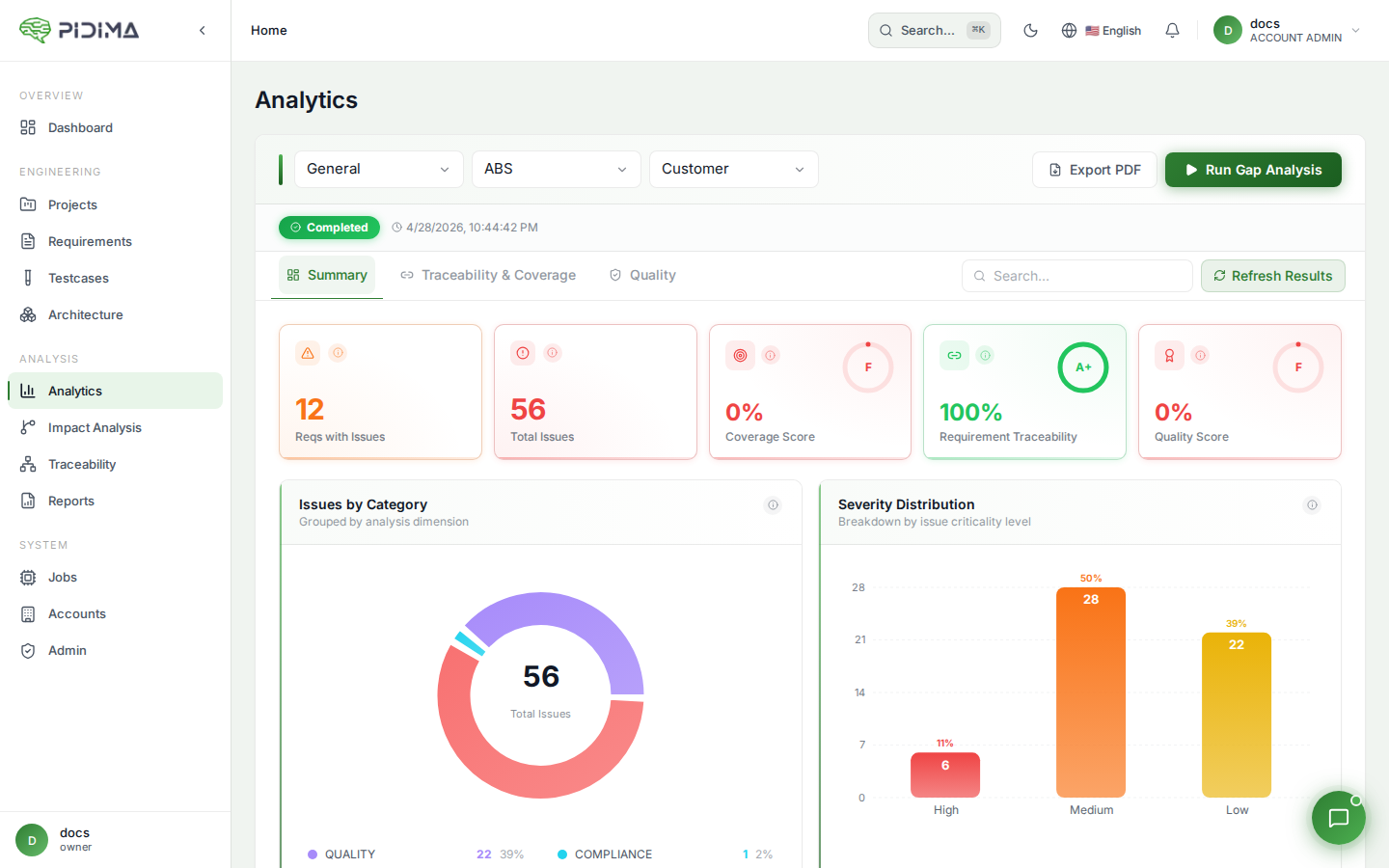
Gap Analysis is Pidima's automated analytics engine that scans your requirements and test cases to identify traceability gaps, coverage issues, quality problems, and compliance risks — all within a single run.
Overview
Gap Analysis operates at the project level scope. You select an account, project, and level, configure which checks to run, and Pidima executes them asynchronously. Results are displayed in an interactive dashboard with charts, KPIs, and paginated issue tables.
Each analysis creates a parent job that orchestrates multiple child jobs — one per selected check. Child jobs run in parallel for maximum speed, with a two-phase execution model that ensures quality scores are computed after all other checks complete.
Running a Gap Analysis
- Navigate to Analytics from the sidebar
- Select your Account, Project, and Level
- Click Run Gap Analysis to open the configuration modal
- Select the checks you want to run (see Analysis Options below)
- Click Start — the analysis runs in the background as an async job
You can monitor progress in real time via the progress bar and step counter. The dashboard auto-populates when the run completes. You can also click View Last Report to see results from a previous run, or Refresh Results to reload.
Analysis Options
Gap Analysis supports the following configurable checks, grouped into five categories:
Traceability
| Check | What It Detects | Severity |
|---|---|---|
| Orphan Requirements | Requirements with no DERIVES_FROM link to a parent requirement in a higher level. Root-level requirements are automatically skipped since they don't need upstream links. | Medium |
| Untestable Requirements | Requirements with zero linked test cases in the traceability table. | Medium |
| Unused Test Cases | Test cases not linked to any requirement via the traceability table. | Low |
Coverage
| Check | What It Detects | How It Works |
|---|---|---|
| Insufficient Test Coverage | Requirements where linked test cases don't adequately cover the requirement's intent. | Each requirement is sent individually to the AI with its full test case details. The AI evaluates coverage percentage, identifies missing scenarios, and provides severity and recommendations. Runs in parallel (5 concurrent threads). |
| Requirement Coverage Adequacy | Parent requirements not adequately decomposed into child requirements at sub-levels. | Each parent requirement is analyzed against its child requirements in immediate sub-levels. The AI evaluates whether the children collectively cover the parent's scope, identifies gaps, and suggests specific child requirements to create (with target level assignments). |
Quality
| Check | What It Detects | How It Works |
|---|---|---|
| Conflicting Requirements | Requirements that contradict each other semantically. | Uses an anchor-batch strategy: each requirement is compared against all subsequent requirements in batches. The AI identifies conflicts with confidence scores, rationale, and suggested resolution actions (delete, rewrite, or merge). Bidirectional CONFLICTS links are automatically created. |
| Duplicate Requirements | Semantically duplicate requirements expressed differently. | Same anchor-batch strategy as conflicts. The AI identifies duplicates with confidence scores and suggests which to keep, merge, or delete. Bidirectional DUPLICATES links are automatically created. |
| Conflicting Test Cases | Test cases with contradictory expected outcomes for similar scenarios. | Same anchor-batch approach applied to test cases. Bidirectional CONFLICTS links are created in the testcase_links table. |
| Duplicate Test Cases | Semantically duplicate test cases. | Same anchor-batch approach. Bidirectional DUPLICATES links are created. |
When both Conflicting and Duplicate checks are selected for the same artifact type (requirements or test cases), they are combined into a single AI call per batch for efficiency.
Compliance
| Check | What It Detects | How It Works |
|---|---|---|
| Compliance Check | Requirements that conflict with or partially comply with regulation clauses. | Uses Compliance Intelligence under the hood. Requires selecting one or more regulation documents from your project's document library. Each requirement is checked against the selected documents using RAG-powered semantic search. |
Strictness Configuration
Coverage and quality checks use a configurable strictness level (0.1 to 1.0) that controls how aggressively the AI flags issues:
| Strictness | Mode | Behavior |
|---|---|---|
| 0.1 – 0.3 | Lenient | Only flags serious gaps — missing tests for core functionality, complete absence of testing, obvious major gaps |
| 0.4 – 0.6 | Moderate | Flags missing main scenarios and important sub-requirements, expects coverage of primary functional paths |
| 0.7 – 0.8 | Strict (default) | Expects good coverage of main scenarios AND edge cases, flags gaps in error handling and non-functional requirements |
| 0.9 – 1.0 | Very Strict | Requires comprehensive coverage including ALL edge cases, boundary conditions, error scenarios, and negative cases |
Two-Phase Execution
Gap Analysis uses a two-phase execution model:
- Phase 1 (parallel): All analysis checks except quality scores run simultaneously on a dedicated thread pool
- Phase 2 (deferred): Quality score computations start only after Phase 1 completes, because they aggregate issues created by the other checks
This ensures quality scores accurately reflect the full set of detected issues.
Dashboard & Results
After a run completes, the Analytics dashboard displays results across three tabs:
Summary Tab
- Issues by Category — Donut chart breaking down issues by traceability, coverage, quality, compliance, and decomposition
- Severity Distribution — Distribution of issues across Critical, High, Medium, Low, and Info levels
- KPI Cards:
- Coverage Score — Percentage of requirements with at least one linked test case (forward traceability)
- Traceability Score — Percentage of requirements with at least one upstream link to a parent requirement
- Quality Score — Overall quality rating based on detected issues
- Requirements Impact Overview — Paginated table showing each requirement's issue categories, total issues, and highest severity. Supports pagination for large datasets.
Traceability & Coverage Tab
- Coverage Ratio — Gauge chart showing the percentage of requirements covered by test cases
- Orphan vs Linked Requirements — Donut chart comparing requirements with and without upstream links
- Requirements vs Test Cases (Links) — Scatter heatmap showing the requirement-to-test-case link density across the level
- Insufficient Test Coverage — Heatmap showing coverage percentages for under-covered requirements. Each cell displays the AI-computed coverage percentage — lower values indicate gaps needing additional test cases.
- Traceability & Coverage Issues (Requirements) — Paginated table of requirement-level traceability and coverage issues
- Traceability & Coverage Issues (Test Cases) — Paginated table of test-case-level traceability issues
Quality Tab
- Duplicate and Conflicting Issues — Tables listing detected quality problems with AI-generated explanations, confidence scores, and the related artifact
Resolving Issues
Each issue in the results tables can be resolved directly from the dashboard. Resolution runs as an async job and the button shows progress in real time.
Resolution Strategies by Issue Type
| Issue Type | Resolution Strategy |
|---|---|
| Orphan Requirement | Finds candidate parent requirements via vector similarity search, then uses AI to confirm which are valid parents. Creates DERIVES_FROM links with UNDER_REVIEW status. Supports linking to multiple parents. |
| Untestable Requirement | Triggers the full AI-powered test case generation pipeline, creating test cases and linking them to the requirement via traceability. |
| Unused Test Case | Finds matching requirements via vector similarity + AI, creates traceability links. Alternatively, you can choose to delete the test case. |
| Insufficient Test Coverage | Generates targeted test cases for the specific missing scenarios identified during analysis. The missing scenarios from the gap analysis are passed as context so the AI creates exactly those test cases. |
| Requirement Coverage Adequacy | Creates child requirements in the appropriate sub-levels using the suggestions pre-computed during analysis. Each suggestion includes a target level, name, and description. |
| Duplicate Requirement | Compares linked test case counts. The requirement with fewer linked test cases is marked as OBSOLETE (with a revision saved). DUPLICATES links are cleaned up. If AI provided merged content, the kept requirement is updated. |
| Conflicting Requirement | AI decides the resolution: delete one requirement, keep one over the other, or rewrite to remove the conflict. CONFLICTS links are cleaned up. |
| Duplicate Test Case | Deletes the duplicate test case. Mirror issues on the related test case are cleaned up. |
| Conflicting Test Case | Deletes the conflicting test case. Mirror issues are cleaned up. |
Link Suggestions
For orphan requirements and unused test cases, you can click Get Suggestions to see AI-recommended linking candidates without auto-applying them. Each candidate shows:
- Name and description
- Similarity score (from vector search)
- Whether the AI recommends linking (✓ recommended)
You can then select which candidates to link and confirm.
Resolution Preview
For duplicate and conflict issues, click Preview to see which artifact has less test coverage before confirming the resolution. The preview shows test case counts for both sides.
Per-Requirement Scores
Gap Analysis computes three scores visible on individual requirement detail pages:
Quality Score
Based on duplicate and conflict issues detected for the requirement. Deducts 10 points per issue from a base of 100. Returns null if quality checks weren't run.
Test Coverage Score
Average coverage percentage across linked test cases. Returns 0 if the requirement is flagged as untestable. Returns null if coverage checks weren't run.
Adequacy Score
How well the requirement is decomposed into child requirements. Based on the coverage percentage from the decomposition adequacy analysis. Returns null if adequacy checks weren't run.
Level-Wide Quality Scores
Gap Analysis also computes level-wide quality scores using a weighted formula:
Weighted Issues = (High × 3) + (Medium × 2) + (Low × 1)
Max Score = Total artifacts × 3
Quality Score = 100 - (Weighted Issues / Max Score × 100)
| Score Range | Quality Level |
|---|---|
| 80–100% | High |
| 50–79% | Medium |
| 0–49% | Low |
Best Practices
- Run Gap Analysis after importing or bulk-creating requirements to catch issues early
- Enable all traceability checks for regulated projects to ensure complete coverage
- Use the compliance check with your regulation documents before milestone reviews
- Start with moderate strictness (0.5) and increase as your project matures
- Re-run after resolving issues to verify improvements and update scores
- Use the per-requirement scores to prioritize which requirements need attention first
- For large projects (100+ requirements), expect the quality checks to take several minutes due to the pairwise comparison strategy
- Review AI-created links (marked UNDER_REVIEW) before approving them